

Query::update_recordset is perfect when you need to know what x++ update_recordset is used for to flip inventory- and warehouse-related flags or defaults across lots of items without looping row-by-row.
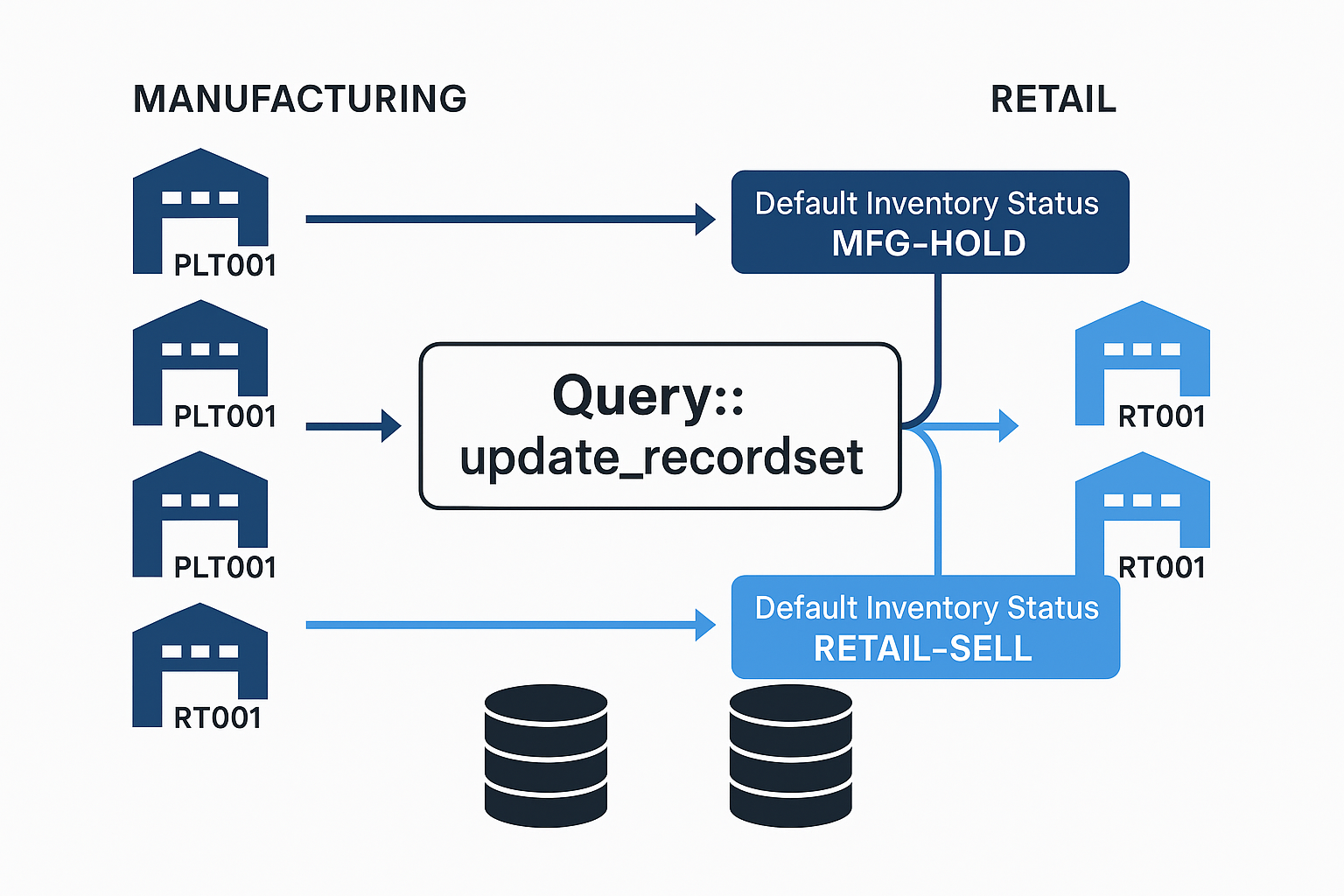
In Dynamics 365 Finance & Operations, inventory behavior is often steered by defaults defined per item and warehouse (for example, the default Inventory Status a site/warehouse should use). Rather than iterating over InventItemLocation records and calling update() repeatedly, you can target the exact set you want with a Query, then push a single set-based update. This is especially helpful when you have to realign stock for manufacturing plants versus retail distribution centers—e.g., moving plant warehouses to a “hold” status while switching retail warehouses back to a sellable status.
Below are two concrete patterns. The first marks a group of plant warehouses (IDs starting with PLT) to a manufacturing hold status (MFG-HOLD). The second moves retail warehouses (IDs starting with RT) to a sellable status (RETAIL-SELL). Both operate on InventItemLocation, joined to InventLocation so the update can be filtered by warehouse ID pattern. You can add extra ranges (like Sites or specific Items) the same way—by extending the query with additional ranges or joins. Because this is set-based, it completes in one database trip per operation and avoids per-record business logic unless your table setup forces a fallback.
// Manufacturing: push a default Inventory Status of "MFG-HOLD" to plant warehouses (e.g., PLT*).
static void UpdateDefaultStatusForManufacturing(Args _args)
{
    Map                     fieldMap = new Map(Types::String, Types::String);
    Query                   q        = new Query();
    QueryBuildDataSource    qbIL, qbLoc;

    // Build the query: InventItemLocation joined to InventLocation so we can filter by warehouse.
    qbIL  = q.addDataSource(tableNum(InventItemLocation));
    qbLoc = qbIL.addDataSource(tableNum(InventLocation));
    qbLoc.relations(true);
    qbLoc.joinMode(JoinMode::InnerJoin);

    // Limit to plant warehouses, e.g., PLT001, PLT002...
    qbLoc.addRange(fieldNum(InventLocation, InventLocationId))
         .value(SysQuery::valueLike("PLT%"));

    // (Optional) limit to a site:
    // qbIL.addRange(fieldNum(InventItemLocation, InventSiteId))
    //     .value(queryValue("MFG-SITE"));

    // (Optional) limit to a subset of items (pattern):
    // qbIL.addRange(fieldNum(InventItemLocation, ItemId))
    //     .value(SysQuery::valueLike("MF%"));

    // Set the default inventory status to MFG-HOLD for the matched records.
    fieldMap.insert(fieldStr(InventItemLocation, InventStatusId), "MFG-HOLD");

    ttsBegin;
    Query::update_recordset(fieldMap, q);
    ttsCommit;
}
// Retail: push a default Inventory Status of "RETAIL-SELL" to retail DCs (e.g., RT*).
static void UpdateDefaultStatusForRetail(Args _args)
{
    Map                     fieldMap = new Map(Types::String, Types::String);
    Query                   q        = new Query();
    QueryBuildDataSource    qbIL, qbLoc;

    // Build the query: InventItemLocation joined to InventLocation to target retail warehouses.
    qbIL  = q.addDataSource(tableNum(InventItemLocation));
    qbLoc = qbIL.addDataSource(tableNum(InventLocation));
    qbLoc.relations(true);
    qbLoc.joinMode(JoinMode::InnerJoin);

    // Limit to retail warehouses, e.g., RT001, RT002...
    qbLoc.addRange(fieldNum(InventLocation, InventLocationId))
         .value(SysQuery::valueLike("RT%"));

    // (Optional) limit to a retail site:
    // qbIL.addRange(fieldNum(InventItemLocation, InventSiteId))
    //     .value(queryValue("RT-SITE"));

    // Flip the default inventory status to RETAIL-SELL for the matched records.
    fieldMap.insert(fieldStr(InventItemLocation, InventStatusId), "RETAIL-SELL");

    ttsBegin;
    Query::update_recordset(fieldMap, q);
    ttsCommit;
}
These examples keep the update logic declarative and easy to re-run during cutovers or seasonal switches. If you need to set multiple fields at once—say a custom “blocked” flag in addition to the default status—just add more fieldMap.insert(...) lines before calling Query::update_recordset(...).
Have a Question ?
Fill out this short form, one of our Experts will contact you soon.
Talk to an Expert Today
Call Now