

In mid-September 2025, Microsoft energized its Power Platform community with a clear vision of the “agentic” future of work. At the Power Platform Community Conference 2025 (PPCC 2025), leadership highlighted how Power Apps, automation agents, and Microsoft Copilot now seamlessly integrate as three pillars of an AI-driven enterprise.
The keynote message underscored that apps remain the foundation of business impact, agents automate and orchestrate processes, and Copilot connects everything by infusing intelligence into daily workflows. Together these enable organizations to evolve into “Frontier Firms” – industry-leading businesses that harness AI alongside human workers to transform how work gets done. This concept of Frontier Firms involves reimagining collaboration with AI “coworkers” to drive real impact rather than simply deploying isolated bots. Executives at the event emphasized strategic themes of apps, agents, and Copilot working in harmony on one managed platform, turning AI from a mere feature into the foundation of business operations. Major demonstrations and discussions illustrated this vision: for example, showing how an AI “plan” can coordinate multiple agents across Microsoft 365 and Dynamics 365, all orchestrated within a single low-code solution. The strategic messaging was clear – by uniting people with intelligent agents and low-code tools under strong governance, organizations can accelerate innovation and become truly AI-powered at scale. This community gathering not only celebrated recent innovations but also set a forward-looking tone, inviting business leaders to embrace the shift to an agentic reality where human creativity is amplified by ubiquitous AI assistance.
Power BI Advances: September 2025 Feature Summary
Microsoft’s Power BI platform saw significant updates in September 2025, aligning with the broader AI integration theme. Notably, the Copilot AI assistant in Power BI moved to center stage. A new standalone Copilot experience – a full-screen chat interface for “chat with your data” – is now enabled by default for all tenants that have Copilot turned on. This means users can ask questions in natural language and get insights from their Power BI data more readily, reflecting Microsoft’s confidence in Copilot’s enterprise readiness. (Administrators still retain control: they can opt out of the auto-on via a simple toggle if an organization needs more preparation time.) The September update also improved Copilot’s usability by auto-selecting an appropriate workspace for each user when they invoke Copilot, eliminating a point of friction. Previously, users had to manually choose a “Copilot workspace” for billing and compliance, which caused confusion; now the service intelligently assigns one (e.g. favoring a capacity with available headroom), while still allowing overrides. These changes streamline the Copilot experience and lower barriers for business users to leverage AI-driven analytics. Complementing this, Power BI enhanced its semantic model capabilities – a critical update for enterprise BI teams. As of September 2025, users can edit Power BI data models directly in a web browser, bringing full parity with desktop modeling tools and even enabling Mac users to design datasets entirely online. This general availability of web-based semantic model editing is a milestone that accelerates development cycles and collaboration. Likewise, live editing of Direct Lake datasets (for Microsoft Fabric) in Power BI Desktop reached GA, and a new Tabular Model Definition Language (TMDL) view was introduced to allow code-first model editing with advanced find/replace and scripting support. Such features signify a maturing BI platform that supports both low-code and pro-code workflows side by side. There were also AI-centric enhancements: the update previewed a “Prep data for AI” feature in the service, enabling analysts to mark datasets as “Copilot-ready” (with defined schema, sample questions, and verified answers) entirely through the web interface. This upcoming capability will make it easier to ensure Power BI content is optimized for use with Copilot and Microsoft 365 search. Furthermore, Power BI’s search and Q&A functions grew smarter – Copilot can now generate descriptive captions for reports without manual descriptions, and search results will boost content that is flagged as “prepped for AI,” helping users find trustworthy, AI-optimized reports more quickly. Rounding out the September 2025 improvements were several usability updates and deprecations important for planning. A noteworthy change in visualization is the removal of the old Bing Maps visual from the default pane, part of an effort to streamline default options in favor of modern Azure Maps. In reporting, the Performance Analyzer tool became available in the Power BI Service’s web editor, allowing report designers to measure and tune report load times after publishing (previously this diagnostic was limited to Power BI Desktop). New DAX functions arrived as well – for example, support for week-based time intelligence (functions like TOTALWTD and PREVIOUSWEEK) and the preview of DAX User-Defined Functions for reusable calculations, catering to advanced analytics scenarios. Finally, mobile BI usage stands to benefit from the general availability of NFC tag support: with a tap of a phone on an NFC tag, frontline employees can now pull up specific Power BI reports or dashboards instantly on the mobile app. This innovation merges physical operations with real-time data access – for instance, a store manager could tap a shelf tag to open inventory dashboards, streamlining data-driven decisions on the go. Collectively, the September 2025 Power BI updates demonstrate Microsoft’s dual focus on infusing AI into analytics experiences and meeting the practical needs of enterprise BI (performance, governance, and usability).
2025 Release Wave 2 Roadmap: AI-Empowered Platform (Oct 2025 – Mar 2026)
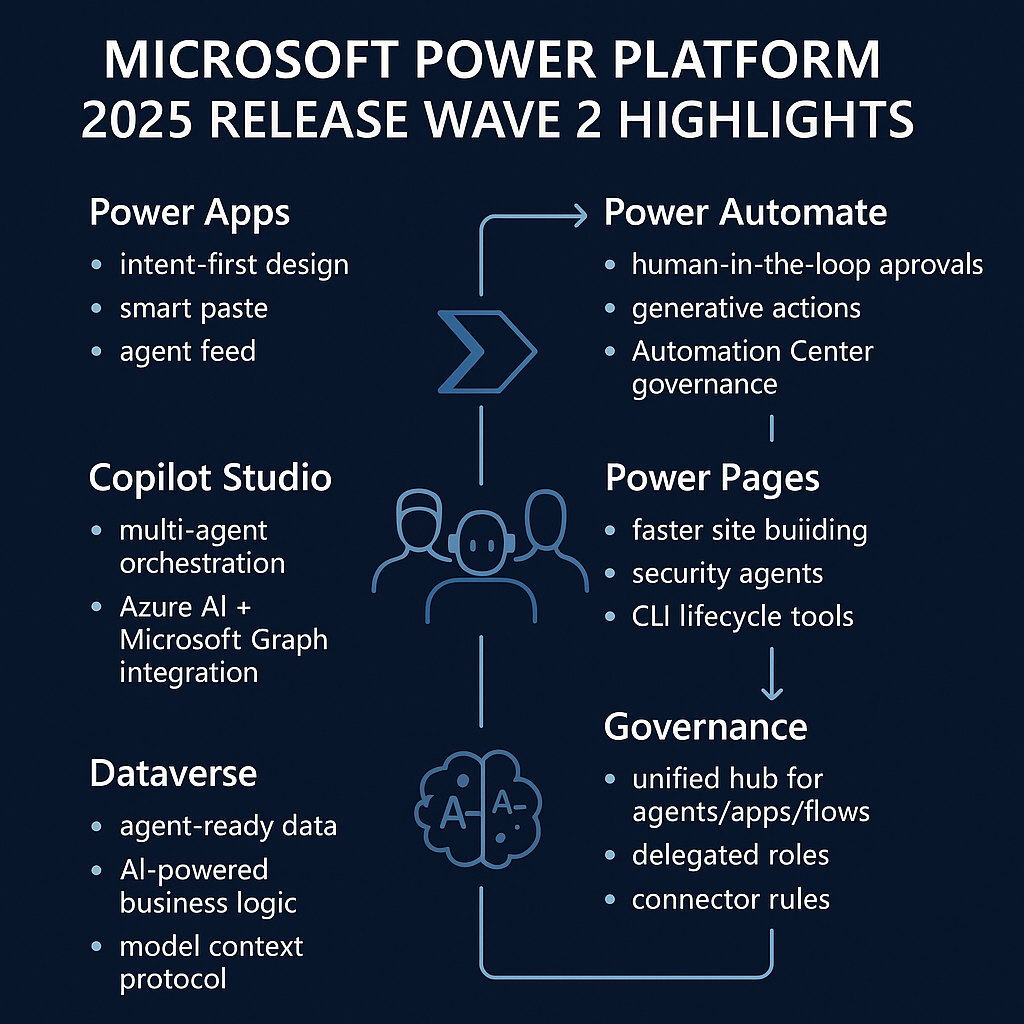
Looking ahead, Microsoft published the Power Platform 2025 Release Wave 2 plan (covering features launching from October 2025 through March 2026). This wave is expansive, comprising “hundreds of new features” across Power Apps, Power Automate, Power Pages, the new Copilot Studio, Dataverse, and core platform governance. A unifying theme is deeper AI and agent integration into every part of the low-code platform. For example, Power Apps in this wave introduces an “intent-first” app design model, where makers can describe app logic or even provide an example image and let an agent (via Copilot) build data-connected experiences from that intent. In practice, this includes features like an agent feed within apps to supervise or collaborate with automation agents, and a Plan Designer that can generate end-to-end solutions (apps, flows, reports) from a problem statement. Power Automate is similarly enhanced to handle more complex enterprise workflows; the plan highlights human-in-the-loop processes such as advanced approval flows, and “generative actions” that leverage AI for content processing. To support automations at scale, Microsoft is also rolling out a comprehensive set of governance and observability controls in the Automation Center and admin center, ensuring large organizations can monitor and secure their growing fleet of flows. Power Pages will see boosts in AI-driven development and security – the wave promises faster ways to build externally facing sites with low code, and the introduction of “security agents” that give makers and admins proactive insights and tools to secure web portals. Meanwhile, the newly launched Microsoft Copilot Studio (which is the environment for building and managing AI copilots and autonomous agents) is set to gain major new capabilities. In this wave, Copilot Studio will enable creation of teams of agents that work together, support more autonomous behaviors integrated with Microsoft 365 Copilot, and offer improved governance for enterprise use. Notably, Copilot Studio will tie in more closely with Azure’s AI services (like Azure AI Foundry) and the Microsoft Graph, so that custom agents can leverage cutting-edge AI models and rich organizational data securely. The underpinnings of the platform, Microsoft Dataverse, continue to evolve as well. Dataverse is being enriched to better support AI scenarios – for instance, “Dataverse for Teams” is expanding into “Dataverse for Agents,” and new Dataverse search capabilities will improve how bots and copilots retrieve enterprise data. We will also see AI-assisted development of data logic (such as GPT-powered formulas or validations) within Dataverse, underscoring the trend that every layer of the Power Platform will have AI assistance built-in. Finally, crucial for executives, the Governance and Administration aspect of Release Wave 2 is about unifying control in an AI-era. Microsoft is previewing a unified governance hub that will allow IT departments to manage intelligent agents, agent-equipped apps, and automated workflows all from one place. This centralized approach is aimed at ensuring that as business units adopt Copilot and agent solutions, IT can enforce security, compliance, and reliability standards consistently. In terms of timeline, the Wave 2 plan was first unveiled in July 2025 and refined through September, with early access to select features available for customers from August 4, 2025. This early access period allowed organizations to test and prepare for upcoming changes. The general availability rollout commences on October 1, 2025, when production deployment of Wave 2 features begins worldwide. Microsoft has noted that regional deployments will start on that date, following their typical release cadence across data centers. For planning purposes, executives should note that the wave features will then trickle out up to March 2026, with Microsoft policy allowing for possible timeline adjustments. Overall, Release Wave 2 (2025) is geared towards making the Power Platform more AI-first, yet enterprise-ready – blending natural language development, advanced automation, and stringent governance. Organizations can expect a platform that empowers “makers” with unprecedented AI capabilities while giving IT the tools to manage risk and achieve scale.
Delivering on 2025 Wave 1: Key Innovations Realized
As Microsoft drives toward the new wave, it’s worth reflecting on the 2025 Release Wave 1 (which spanned April to September 2025) and the major enhancements that reached customers during that period. Wave 1 was marked by the arrival of practical AI features and pro-development tools that have now become generally available, laying the groundwork for the AI themes of Wave 2. One headline achievement was the rollout of Copilot for Power Automate. This capability allows users to create and refine cloud flows using natural language conversations, effectively asking Copilot to build an automation or explain an existing one. By mid-2025, makers could simply describe a workflow in everyday language and let Copilot draft the flow, then iteratively improve it via chat – a leap in accessibility for automation design. Another transformative feature delivered in this wave was the Git source control integration for Power Platform solutions, including canvas apps. In April 2025, Microsoft announced that Git integration is now generally available across the Power Platform, “effortlessly synchronizing agents, apps, automations, and other solution objects with source control”. This replaces the earlier experimental source sync for Canvas apps with a robust, official capability. The impact for enterprises is significant: professional development teams can manage Power Apps and flows with the same rigor as traditional code – tracking changes, collaborating via pull requests, and integrating with CI/CD pipelines. By exposing the underlying source (like canvas app definitions) and keeping it in sync with Git, Microsoft has bridged low-code development with professional DevOps practices. Also notable in Wave 1 were AI enhancements in Power Pages and Power Apps portals. Microsoft brought generative AI to web portals by previewing features like Copilot-generated text and forms for Power Pages, and, as discussed later, preparing generative AI search (which became GA in September). These AI assists lower the skill barrier for creating user-friendly websites on Dataverse data. For makers of model-driven apps, Wave 1 introduced the ability to embed Copilot chat in apps and even customize its knowledge (in preview), so each app can have its own AI helper aware of that app’s data – a feature that completed preview rollout during this period. On the administration front, Automation Center observability improvements gave IT better visibility into flow health and usage. Microsoft modernized the Power Platform Admin Center itself in 2025 (the new admin center went live in June), providing analytics on flow runs and centralized logs that admins can use to troubleshoot or audit automations. For instance, the updated Admin Center includes unified monitoring for cloud flows and robotic process automation (RPA) bots, helping organizations detect failures or performance issues proactively. This was complemented by governance enhancements like data exfiltration prevention: by Wave 1’s end, administrators could enforce environment-level app allow/block lists to control which applications can run in a given Dataverse environment. This feature, now generally available, helps prevent rogue or unapproved apps from siphoning sensitive data, thereby strengthening environment security. In summary, the April–September 2025 wave delivered substantial progress in making the Power Platform more intelligent, open, and secure. It put AI into the hands of every maker (through Copilot in Power Automate and Power Apps), opened up the platform for software engineering best practices (through Git integration and solution APIs), and gave administrators finer control over their low-code ecosystems (through the new admin center, improved analytics, and security controls). These foundational improvements set the stage for the Wave 2 innovations arriving in late 2025.
AI Capabilities Reach General Availability: Natural Language in Apps and Pages
By September 2025, some of the Power Platform’s previously preview AI features transitioned into general availability, making them supported and ready for broad production use. A prime example is the Natural Language Search and Filtering in model-driven Power Apps. This capability, often dubbed the “Smart Grid” feature, enables end-users to find records and refine views by simply typing queries in plain language – no need to craft complex filter logic. As of late September, Microsoft announced this feature would be generally available for all customers by the end of that month. Practically, this means a user can type something like “show me all open sales opportunities in Europe over $100k” into a model-driven app’s view search bar, and the system will interpret and apply the appropriate filters on the grid. This dramatically improves usability for business users, allowing them to slice data without deep technical know-how. During preview, enabling this required an admin opt-in (toggling on “Natural Language View Search” in the environment settings). With GA, organizations can expect the feature to be more polished and, over time, possibly enabled by default as it proves its reliability. It’s also integrated with the Power Apps Copilot experience – in effect bringing Copilot’s understanding of natural language directly into the standard UI of model-driven apps. Early adopters have found it reduces the steps needed to filter data and lowers training effort for new users, since asking questions is more intuitive than building ad-hoc queries. Administrators should note that while this is a user-facing enhancement, it aligns with the broader trend of natural language interfaces sweeping across Microsoft 365, and they should ensure their teams are aware of how to use it (and govern its appropriate use of data). Meanwhile, Power Pages – the Power Platform’s web portal capability – achieved a significant AI milestone in September 2025 with the GA of Power Pages Search with Generative AI Summarization. This new search experience brings an intelligent, Bing-like capability to websites built on Power Pages. When a site visitor searches the portal, they can now enter natural language questions and receive an AI-generated summary of the answers drawn from the site’s content, complete with citations linking back to the source pages. For example, on a customer self-service portal, a user could ask “How do I reset my product password?” and the portal’s search would return a concise, AI-written answer synthesized from knowledge base articles, along with links to those articles. This makes finding information faster and more conversational. From an organizational perspective, it enhances user satisfaction by providing direct answers (much like an internal ChatGPT trained on the company’s web content) while still respecting content boundaries and giving source references. The GA release expanded this feature’s language support to 19 languages, meaning global audiences can benefit from summaries in their native language as long as the site’s content is translated accordingly. Importantly, Microsoft designed this AI search with flexibility for makers and developers: citizen developers can easily drop in the pre-built AI Search component on their site to enable it, whereas pro developers have the option to use a Search API to integrate these intelligent results into custom UX or combine them with other data. The availability of Power Pages AI Search in September indicates Microsoft’s confidence in its alignment with compliance standards (since generative AI responses are now served within a product under enterprise agreements). Companies deploying Power Pages should evaluate turning on this feature to make their external or internal portals far more engaging. However, they’ll also need to curate and maintain high-quality content – since the AI can only summarize what exists, information architecture and content governance become even more crucial. In sum, the general availability of natural language query and AI-powered search in Power Apps and Power Pages exemplifies how Microsoft’s 2025 strategy has moved from experimental AI features to delivering tangible, integrated AI improvements in production. These enhancements carry strategic value: they improve user productivity and satisfaction, reduce training overhead, and can differentiate an organization’s digital experience. Executives should ensure that enablement of these features (which may require admin action to turn on or configure) is part of their rollout plans, coupled with user education and content curation to maximize the benefits.
Community Call Insights: Use Cases Showcased (Sept 23, 2025)
On September 23, 2025, Microsoft’s developer relations team hosted the monthly Microsoft 365 & Power Platform Community Call, which offered a concise look at how real-world solutions are being built with the platform’s latest capabilities. These community calls (led by the Microsoft 365 PnP team) typically combine Microsoft announcements with MVP and employee-led demos. In the late-September session, two particularly illustrative demos were presented. First, Microsoft MVP Paolo Pialorsi demonstrated patterns for handling user settings in SharePoint Framework (SPFx). This is a scenario relevant to many enterprises: building custom SharePoint or Teams components that remember user preferences or configuration. Paolo’s demo showed best practices to store and retrieve user-specific settings (for example, UI theme choices or personalized defaults) within SharePoint applications. By using SPFx capabilities along with the Power Platform (likely storing settings in a list or Dataverse and surfacing them via web parts), the solution illustrated how fusion development can enhance user experiences in Microsoft 365. The takeaway for an executive audience is that the Power Platform isn’t only about standalone apps – it also augments custom Microsoft 365 solutions, providing a unified approach to personalization and integration across the M365 suite. The second demo was delivered by Microsoft’s Sarah Critchley and Matthew Barbour, focusing on “on-behalf-of” flows using the Microsoft 365 Agents SDK. This cutting-edge topic is tied to the new Copilot extensibility model. The M365 Agents SDK allows developers to create custom “plugins” or connectors for Microsoft 365 Copilot and Agents. Sarah and Matthew showed how a Power Automate flow could be triggered by an AI agent (Copilot) to perform actions on behalf of a user – for instance, an agent that, when instructed by a user in natural language, invokes a pre-built cloud flow to update a system or fetch data from an internal line-of-business app. They demonstrated the security model for such on-behalf-of scenarios, which ensures the agent can execute with the user’s delegated permissions safely. This use case is highly strategic: it highlights how Power Platform automations can be woven into the fabric of Microsoft 365 Copilot’s experiences. In practice, as companies start adopting Microsoft 365 Copilot, they will want it to not only answer questions but also take actions (like creating a work item in Azure DevOps or approving a request in an external system). The demos in the community call showed that this is achievable by pairing the Power Platform (for the action logic) with the new Agents SDK for Copilot (for integration and conversation). Executives evaluating Copilot’s value should note that their existing Power Platform investments – such as a library of Power Automate flows – can be leveraged to extend Copilot’s capabilities, providing immediate ROI when these two worlds are connected. Beyond those demos, the community call also covered recent news. It likely touched on the September Power Platform announcements (Copilot updates, etc.) and featured quick community spotlights. For example, in the same week, a contributed presentation on governance using Power Automate (by an industry expert Sandeep M.) was noted, as well as integration patterns that combine SPFx, custom web parts (nicknamed “Hilly Billy” webpart), and Power Apps forms into a seamless solution. These discussions reinforce how the Power Platform is being used in tandem with classic Microsoft 365 development to solve business problems. In summary, the September 23 community call underscored real use cases: from enhancing user-facing solutions (personalized SharePoint apps) to bridging AI and automation (Copilot-triggered flows). For an executive, these examples provide a glimpse of the art of the possible – showing that the investments Microsoft is making in AI and low-code are already yielding practical patterns that can be adopted or adapted. It also reflects a vibrant community ecosystem, where shared learning accelerates innovation on the platform.
Governance, Security, and Licensing Considerations
As the Power Platform grows in capability – especially with AI and cross-tenant integrations – Microsoft has simultaneously expanded the governance and security toolset to help organizations maintain control. Between April and September 2025, several key governance enhancements and guidance updates emerged. Copilot enablement is a top-of-mind issue for many executives, as these AI features are powerful but also need careful oversight. By default, Microsoft keeps Copilot (and other Azure OpenAI-powered features) off until an administrator explicitly enables them for the tenant or environment. In products like Power BI, an admin must toggle on “Users can use Copilot and other features powered by Azure OpenAI” in the admin portal to grant access. Only after that setting is enabled will Copilot (and the new default-on chat experience) light up for end-users. This opt-in approach lets organizations perform due diligence – such as reviewing compliance implications and preparing data (e.g., using the “prepare content for AI” tools) – before unleashing Copilot broadly. Leaders should ensure their governance bodies (like a Power Platform Center of Excellence) establish criteria for when to enable Copilot, how to monitor its usage, and how to educate users on PL-900 Power Platform fundamentals training and its responsible use through higher quality versions like those provided by Dynamics Edge. Environment security controls also advanced. A noteworthy GA feature, delivered via the new Security Compliance portal in the Power Platform Admin Center, is the ability to prevent data exfiltration by securing app access. Admins can now designate which Microsoft 365 or third-party applications are permitted to run in a given Dataverse environment and then enforce that only those approved apps can execute within it. This effectively creates an application allow-list at the environment level. It mitigates the risk of a malicious actor using an unapproved app or tool to extract data from Dataverse. For example, a company could allow only its official customer engagement app and a few trusted ISV apps in a production environment, blocking all others. Administrators have both an audit mode (to observe what apps are in use) and an enforcement mode (to actually block non-approved apps). Such controls dovetail with existing Data Loss Prevention (DLP) policies that manage connector usage, giving a more holistic security posture. In the same vein, Microsoft has introduced an Agent governance hub (as part of Release Wave 2) to oversee the new Copilot and autonomous agents. This centralized governance interface will allow IT to review all enterprise agents, see who built them, what data they have access to, and manage approvals or changes. The goal is to prevent unchecked proliferation of AI agents operating with sensitive data. On the licensing and role management front, Microsoft provided clarity for partners via delegated administration roles. Cloud solution provider (CSP) partners and large enterprises can designate delegated admins who have limited Power Platform admin rights (for example, the ability to manage environments and users, but not see business data or enter the maker studios). This allows outside administrators or specialized support teams to assist customers without violating least-privilege principles. Additionally, a new Power Platform Administrator role was refined in Azure AD, distinct from Dynamics 365 admin roles, ensuring that organizations can grant Power Platform-specific admin permissions without giving broader tenant admin rights. In Release Wave 2, Microsoft is enhancing delegated operations – meaning admins will be able to assign tasks like component deployment or connection approval to specialized roles, improving governance workflow. Another important consideration is connector governance. With over 900 connectors available, organizations often need to restrict certain connectors to comply with regulations (for example, blocking social media connectors in a financial institution environment). Microsoft’s Data Policy (DLP) capabilities have been enhanced in 2025 to support more granularity – including the ability to mark connectors as blocked, allowed, or internal-only and to enforce connector groups at the environment level. The 2025 Wave 2 plan explicitly notes new connector rules to improve compliance control. Executives should ensure their IT teams regularly review connector usage and update DLP policies, especially as new connectors (and even AI plugins) become available. Lastly, geographic availability and data residency remain crucial, especially with AI features. Initially, some Copilot services were only deployed in certain regions (for example, early previews might have been limited to North America and Europe). By late 2025 Microsoft has expanded Copilot availability, but organizations in sovereign or restricted clouds (GCC, GCC High, etc.) may still face delays. Additionally, features like the Power BI Fabric Copilot require capacities in supported regions and SKUs (e.g., a Power BI tenant must have an F2 capacity in a region where Copilot is enabled to use the full Copilot experience). Microsoft provides regional deployment schedules (as referenced in release plans) – e.g., Wave 2 features starting rollout on October 1, 2025, but some regions might receive updates slightly later. It’s advisable for organizations operating globally to coordinate with Microsoft account teams on any geo-specific constraints and to plan feature rollouts accordingly. In conclusion, the April–September 2025 period not only delivered new capabilities but also the governance guardrails to use them responsibly. Microsoft’s approach (reflected in official guidance and community calls) is to empower admins with tools like the new Power Platform Admin Center (launched with improved navigation and analytics), while embedding compliance features into the product (such as audit logs for AI actions, tenant settings for Copilot, and integrated security scans for Power Pages code). For an executive, this means that adopting the Power Platform’s latest innovations can be done with confidence, provided that equal attention is given to configuring these governance features and updating organizational policies to account for AI and low-code democratization. The platform’s evolution continues to balance agility with control – a critical balance for successful enterprise technology adoption.
Have a Question ?
Fill out this short form, one of our Experts will contact you soon.
Talk to an Expert Today
Call Now