

Are you prepared for the WAVE Microsoft Copilot in Azure (often simply called Azure Copilot) is an AI-powered assistant embedded in the Azure cloud platform. It leverages large language models (LLMs) along with knowledge of your Azure environment to help manage and optimize cloud resources.
For example, Copilot in Azure can answer questions about your Azure services, generate scripts or queries, and even perform certain tasks with your confirmation. It acts as a conversational aide in the Azure Portal (and via CLI through an “AI Shell”), helping cloud administrators design architectures, troubleshoot issues, and learn about Azure features using natural language prompts. By unifying insights across hundreds of Azure services, Azure Copilot aims to increase productivity and provide guidance, at no extra cost as of now. In short, Azure Copilot is like having a cloud expert on hand – it assists with Azure cloud operations via chat, but does not require any custom development to use (it’s built into Azure).
Building Custom Copilots on Azure – The “Custom Copilot” Stack
Beyond the built-in assistant for Azure management, organizations often want to create their own AI copilots – intelligent agents or chatbots tailored to specific business needs and data. Microsoft provides a stack of Azure services (sometimes termed the *“Azure custom copilot” stack) to enable this. This stack includes components like Azure AI Studio, Azure OpenAI Service (providing GPT-4, GPT-3.5 and other foundation models), Azure AI Search (formerly Cognitive Search for retrieval-augmented generation), and related Azure services for hosting and integration. By combining these, developers can build a custom Copilot – essentially a domain-specific AI assistant – that can plug into enterprise data and applications. According to one Azure partner brief, an “Azure Custom Copilot” can be delivered as a plugin or app integrating with various systems on Azure. Key steps include assessing data sources, using Azure OpenAI SDKs/APIs, integrating enterprise data (often via knowledge bases or vector databases), crafting a conversational interface, and ensuring security and compliance. This approach allows businesses to go from a general AI model to a customized AI assistant that understands their documents, workflows or products.
Azure AI Studio (now Azure AI Foundry) – The Developer Platform
At the heart of building custom copilots is Azure AI Studio, which was a cloud-based platform for data scientists, AI engineers, and developers to build, train, and deploy AI models and applications on Azure. (In late 2024, Azure AI Studio was renamed to Azure AI Foundry, which we discuss shortly.) Azure AI Studio provided an integrated web portal and toolkit for generative AI: it let teams explore pre-built foundation models, fine-tune or prompt-engineer them, add retrieval augmentation (for grounding the model on your data), create conversational agents, and deploy these as endpoints. In other words, Azure AI Studio was a generative AI application development platform supporting capabilities like model selection and benchmarking, prompt flow design, knowledge base connectors, and safety guardrails. It was designed as a one-stop shop to develop “custom Copilot” solutions on Azure.
Notably, Azure AI Studio could achieve nearly everything Microsoft’s Copilot Studio (Power Platform’s tool) can, but with a more code-first, flexible approach. It supports all kinds of AI use cases – beyond chatbots – including predictive analytics, image/video analysis, and custom ML models. This makes Azure AI Studio (now Foundry) suitable when you need full control to build specialized AI applications or integrate AI into existing apps. In contrast, the Power Platform’s Copilot Studio (below) is a low-code tool mostly for conversational bots. Many enterprises use Azure AI Studio to manage both traditional machine learning and new generative AI solutions under one roof.
“Azure Custom Copilot” generally refers to solutions built using this Azure AI platform. For instance, a UK public tender described a project to be “built using the Azure custom copilot stack e.g. Azure AI Studio, AI Search, Azure OpenAI…and other Azure hosted LLMs”. This highlights that a custom copilot in Azure typically involves orchestrating multiple Azure AI services (LLMs, search indexes, data connectors, etc.) to create an intelligent agent tailored to the organization’s data.
Microsoft Copilot Studio – Evolution of Power Virtual Agents
On the low-code end, Microsoft introduced Copilot Studio as part of the Power Platform – this is essentially the new incarnation of Power Virtual Agents (PVA), Microsoft’s chatbot builder. Microsoft announced that Power Virtual Agents is now part of “Microsoft Copilot Studio”, and the PVA name would be retired. Copilot Studio is described as Microsoft’s conversational AI platform for customizing copilots and building your own AI assistants with a low-code approach.
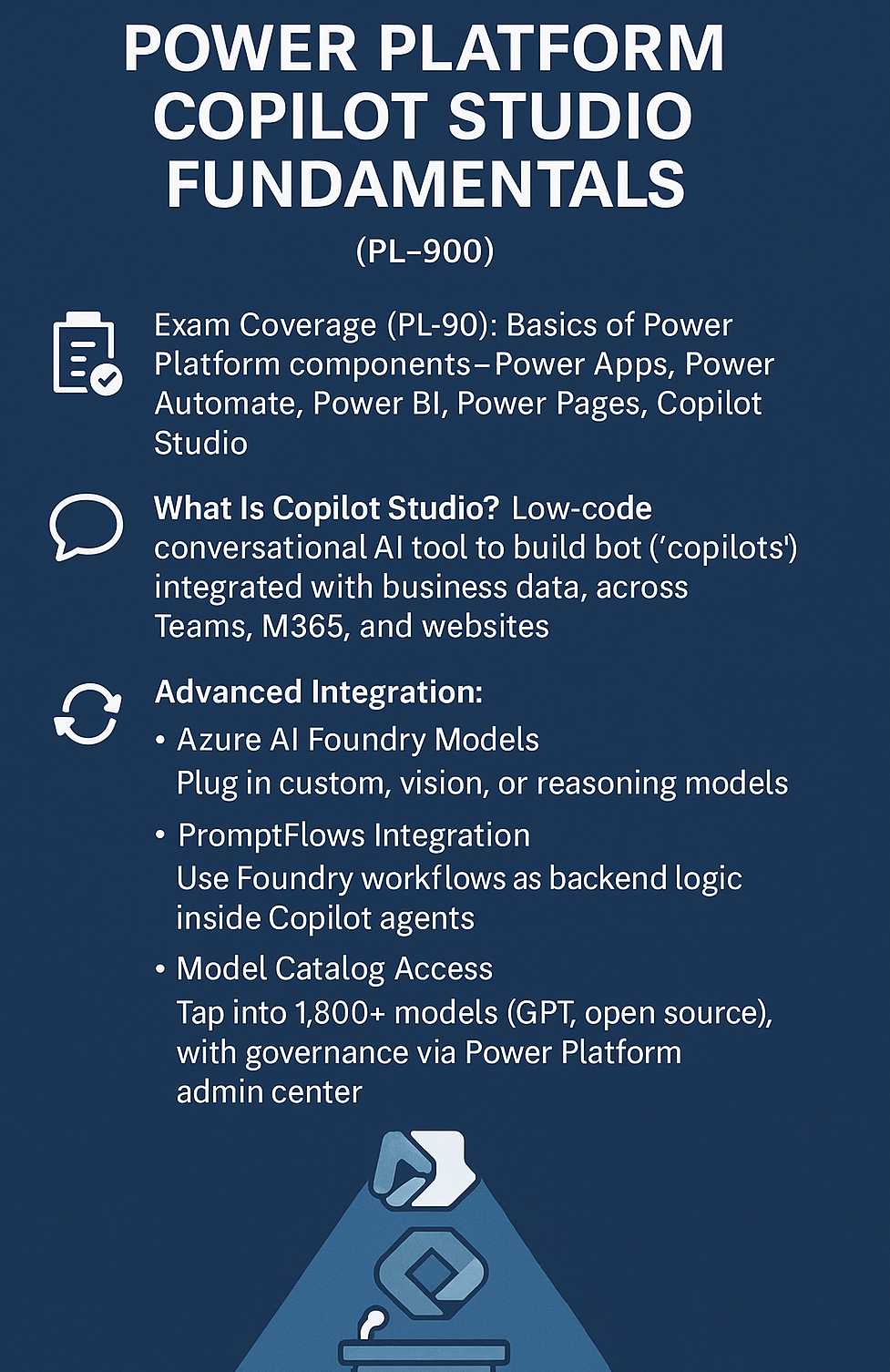
In practical terms, power platform copilot studio fundamentals training January 2026 provides a visual interface to design chatbots (now termed “copilots”) that can connect to various data sources and APIs, similar to how PVA worked but enhanced with generative AI capabilities.
What does Copilot Studio do? It enables users (often called “makers” in the Power Platform) to create and deploy conversational bots that leverage AI. These bots can be deployed across channels like websites, Teams, mobile apps, or integrated into Dynamics 365 and other Microsoft platforms. Under the hood, Copilot Studio inherits all of PVA’s functionality (flow management, connectors, multi-channel deployment) and adds new AI superpowers. For example, power platform copilot studio training September 2026 makers can now plug in large language models to allow the bot to generate answers from unstructured knowledge sources, rather than purely relying on predefined topics. The Copilot Studio announcement highlighted new capabilities like connecting a copilot to your enterprise data via pre-built or custom plugins (essentially connectors that bring in data), orchestrating workflows, and managing these copilots in one central place. In essence, Copilot Studio lets organizations build their own enterprise chatbots (“copilots”) with minimal code – incorporating generative answers, connecting to internal systems, and even customizing the behavior of Microsoft 365 Copilot for their tenants. It’s a fusion of conversational AI and the Copilot concept.
It’s important to note that Copilot Studio is fundamentally a chatbot-focused tool – it specializes in conversational interfaces (chat Q&A, virtual agents). As an official blog states, it is “a low-code tool that uses AI to create copilots, also known as chatbots”. Typical use cases include power platform fundamentals training April 2026 customer service bots, employee self-service assistants, and FAQ bots that draw on a knowledge base. These copilots can perform actions too (through Power Automate flows or custom APIs), but the primary interaction mode is conversation. Copilot Studio only supports chatbot-style AI agents, whereas Azure’s platform supports all kinds of AI solutions (vision, analytics, etc.). Microsoft underscores this distinction: Copilot Studio is great for augmented conversational solutions, while Azure AI Studio/Foundry is for more advanced or broad AI development.
From Power Virtual Agents to Copilot Studio – Why the Change?
Power Virtual Agents was launched generally in Dec 2019 as a straightforward bot builder. In the years since, the explosion of generative AI – especially GPT-3/4 – has transformed what chatbots can do. Instead of bots limited to scripted Q&A, we now have bots that can generate natural, context-aware responses from vast knowledge sources. Microsoft integrated these advances into PVA (for example, PVA introduced “Generative Answers” in 2023, allowing bots to use the GPT model to answer from unstructured content). As Omar Aftab (Microsoft’s VP of Conversational AI) noted, generative AI enabled chatbots to produce far more engaging, personalized answers and continuously learn from data and feedback.
The rebranding to Copilot Studio signals a strategic shift. Rather than a standalone bot product, the bot capability is now part of the broader “Copilot” vision. Microsoft Copilot Studio is positioned as the place to customize and build copilots – including extending Microsoft 365 Copilot with organization-specific data, as well as creating entirely new AI assistants for internal or external use. Essentially, Microsoft recognized that conversational AI is central to the Copilot strategy, so PVA’s technology became one pillar of the Copilot ecosystem. The name “Copilot Studio” also aligns with other offerings (GitHub Copilot, Microsoft 365 Copilot, etc.), making it clearer that this is a tool to craft AI copilots. And practically, it brings new features: for example, the ability to add plugins/GPTs (OpenAI plugins or “Grounding Provider” connectors) so the copilot can query company data, plus a unified interface to manage all custom copilots in an organization. Microsoft emphasizes that existing PVA customers will see continuity – all their bots carry over into Copilot Studio seamlessly – but now with expanded capabilities to build richer AI assistants.
Comparing Copilot Studio vs Azure AI Studio (Power Platform vs. Azure)
It’s common to wonder which platform to use for building a custom AI assistant: the Power Platform’s Copilot Studio or Azure’s AI Studio/Foundry. Both enable “copilot” experiences but target different audiences and scenarios. Here’s a high-level comparison:
- Copilot Studio (Power Platform) – A low-code solution, ideal for creating conversational agents rapidly without deep coding. It offers over a thousand pre-built connectors to integrate with line-of-business apps and data (e.g. databases, SaaS services). This makes it very attractive if you want a chatbot that can act on various systems (create tickets in ServiceNow, query HR info from SuccessFactors, etc.) with minimal custom development. Copilot Studio is essentially the evolution of a bot builder: it’s best for scenarios like customer support chatbots, HR self-service bots, IT helpdesk assistants, and other FAQ or task bots. It shines when used by power users or solution architects who want quick automation and AI-driven conversations integrated into business workflows. However, it is limited to conversational interfaces – “Copilot Studio only supports chatbots” as one analysis put it plainly. If your AI needs go beyond Q&A and chat (for instance, training a custom image recognition model or doing predictive analytics), Copilot Studio alone is not sufficient.
- Azure AI Studio/Foundry (Azure platform) – A pro-code platform for AI developers. It can do everything Copilot Studio can (you can indeed build chatbots with it too), but it is much more powerful and flexible. Azure Copilot Studio training supports the full spectrum of AI workloads: you can fine-tune models, evaluate different AI models (from OpenAI GPT-4 to open-source models), build multi-modal applications, and manage the end-to-end lifecycle of AI solutions. This is the right choice if you need to develop custom AI applications tailored to specific business needs – not just conversational bots, but also things like recommendation systems, document processors, computer vision solutions, etc.. It requires more coding and AI expertise; you’re dealing directly with Azure services, SDKs, and possibly writing code to integrate models into applications. Most AI engineers, software developers, and data scientists will prefer this route when building sophisticated AI systems.
In practice, these tools can even complement each other. For example, an organization might use Azure AI Foundry to fine-tune a proprietary model or curate a knowledge base, then use Copilot Studio to quickly deploy a conversational frontend for business users on Teams that calls that model. In fact, Azure AI Foundry is built to interoperate with tools like GitHub and Copilot Studio to accelerate development. Microsoft’s internal teams advise: Use Copilot Studio when you want to create custom AI agents and automate tasks with a low-code approach. Use Azure AI (Foundry) when you need to build and deploy custom AI applications tailored to specific needs. An example scenario: if you need a bot for employee FAQs that plugs into SharePoint and HR systems, Copilot Studio can get you there quickly. But if you need to invent a new AI-driven analytics app or deeply integrate AI into a custom software product, Azure’s platform provides the needed depth. Many manufacturers, for instance, find Copilot Studio useful for customer-facing Q&A bots, but rely on Azure AI services for advanced use cases like predictive maintenance models or AI vision on the factory floor. The two offerings target different layers of abstraction (low-code vs. full-code) and complexity, so the choice depends on the problem at hand and the technical skill available.
Azure AI Foundry – Rebranding Azure AI Studio and What’s New
As mentioned, Azure AI Studio was rebranded to Azure AI Foundry in late 2024. This change, announced at Microsoft Ignite 2024, was more than just a new name – it packaged Azure’s generative AI toolset into a unified service with some new capabilities. Azure AI Foundry is marketed as a “unified application platform in the age of AI,” reflecting Microsoft’s intent to streamline enterprise AI development under one umbrella. Essentially, Foundry = Azure AI Studio + additional enhancements.
According to Microsoft’s announcement, Azure AI Foundry includes: the Foundry Portal (which is the web interface, formerly Azure AI Studio), a unified Foundry SDK for developers, an Azure AI Agent Service, a catalog of pre-built AI solution templates, and deeper integration with Azure management features. Let’s break down a few of these:
- Foundry Portal: This is the web UI where teams can design, customize, and manage AI apps and agents. It got an improved Management Center in Foundry – showing connected resources, access privileges, usage quotas, etc., in one place. This addresses enterprise needs for better observability and governance when multiple AI projects are running. The portal still offers all the previous Studio capabilities (model catalog, prompt flow, evaluation tools) but now in a more enterprise-friendly interface.
- Foundry SDK: Microsoft released a unified SDK (and API) so that developers can programmatically work with Azure AI services more easily. This SDK ties together various AI capabilities (from model invocation to knowledge store access) and hooks into popular tools like Visual Studio and GitHub. The idea is to let developers build AI-powered applications that integrate with their existing DevOps workflows. (For example, using the Foundry SDK, you could integrate an AI model into a .NET application, or deploy updates via CI/CD, with out-of-the-box support.)
- Azure AI Agents service: This was introduced as part of Foundry to expand on the “agents” concept that existed in Azure AI Studio. Originally, Azure AI Studio had Conversational Retrieval Agents (think of a chatbot agent that could use RAG – retrieval augmented generation – to answer questions with your data). Under Foundry, the Agents service is more powerful, supporting autonomous agentic AI capabilities. These agents can take actions and perform tasks on behalf of users without step-by-step human direction (for example, an agent that not only answers a question but also, say, executes a workflow or places an order if instructed). Microsoft positions these as enterprise automation helpers, with guardrails that require human review or confirmation before finalizing critical actions. In short, the new agent service in Foundry moves toward AutoGPT-like functionality but in a controlled, business-oriented way. This is an upgrade from the simpler Q&A bots that Azure AI Studio initially offered.
- Expanded Model Catalog: Foundry continued to grow the catalog of AI models available. It not only includes OpenAI’s latest (GPT-4, etc.) and Microsoft’s own models, but also models from third parties and open source. By late 2024, Microsoft announced specialized industry models from partners like Bayer, Rockwell, Fidelity Labs (Saifr), Paige AI (for healthcare, finance, manufacturing domains) available in Foundry. New partnerships with AI tool vendors (Weights & Biases, Gretel, Scale AI, etc.) were also announced to ease fine-tuning and data preparation. This means Azure AI Foundry is not just about Microsoft/OpenAI models; it’s becoming a hub for a variety of frontier models (including open-source LLMs like Meta’s Llama 2 or Mistral) that enterprises can choose from.
- Azure AI Search updates: The Azure Cognitive Search service (rebranded “Azure AI Search”) got an upgrade alongside Foundry – notably a generative query engine was added. This likely refers to more intelligent handling of user queries and integrating generation into search results (e.g., returning a GPT-generated answer synthesized from search index content). Also, vector search and retrieval (core to RAG) became more deeply integrated, including hooking into Azure databases for vector storage, making it easier to implement RAG at scale.
In summary, Azure AI Foundry is an evolution that reflects Microsoft’s vision for enterprise AI development. The name “Foundry” itself suggests a place where raw materials (data, models) are forged into useful products (AI applications) – conveying that this is where you build AI solutions. Microsoft chose this rebranding to unify and clarify their offerings: previously, “Azure AI Studio training” could be confused with potentially other studios (like Azure Machine Learning Studio, or the OpenAI Studio UI). Now “Foundry” stands out and aligns with the idea of an AI factory for enterprises. As an InfoWorld piece noted, the toolkit was repackaged with new updates to better meet enterprises’ needs to develop, run, and manage generative AI apps. Another analysis explained that this shift “reflects Microsoft’s vision to unify and streamline the AI experience for enterprises, making it easier to innovate and scale AI applications.”. In practical terms, the new name fits better because Azure is emphasizing productive AI development at scale: collaborative features, integrated management (like an AWS-like console for AI), and a clear message that Azure is the “go-to platform” for building responsible, enterprise-grade AI solutions. By rebranding and enhancing Azure AI Studio into Foundry, Microsoft underlined the importance of collaborative AI innovation with a more intuitive experience.
For those already using Azure AI Studio, Microsoft has stated that the change to Foundry doesn’t remove functionality – “the only change is that Azure AI Studio is evolving into Azure AI Foundry” and you access capabilities as before, just with the new additions (agent service, etc.). The platform is generally available (GA) as of late 2024 and is free to explore (you pay only for underlying services used, e.g. OpenAI API calls). In essence, Azure AI Foundry represents the maturation of Microsoft’s AI platform, geared towards making it easier for teams to go from experimenting with GPT prototypes to deploying full-scale, governed AI applications in production.
Azure AI-3016 Training – Certification, Career Impact, and Skills Gained
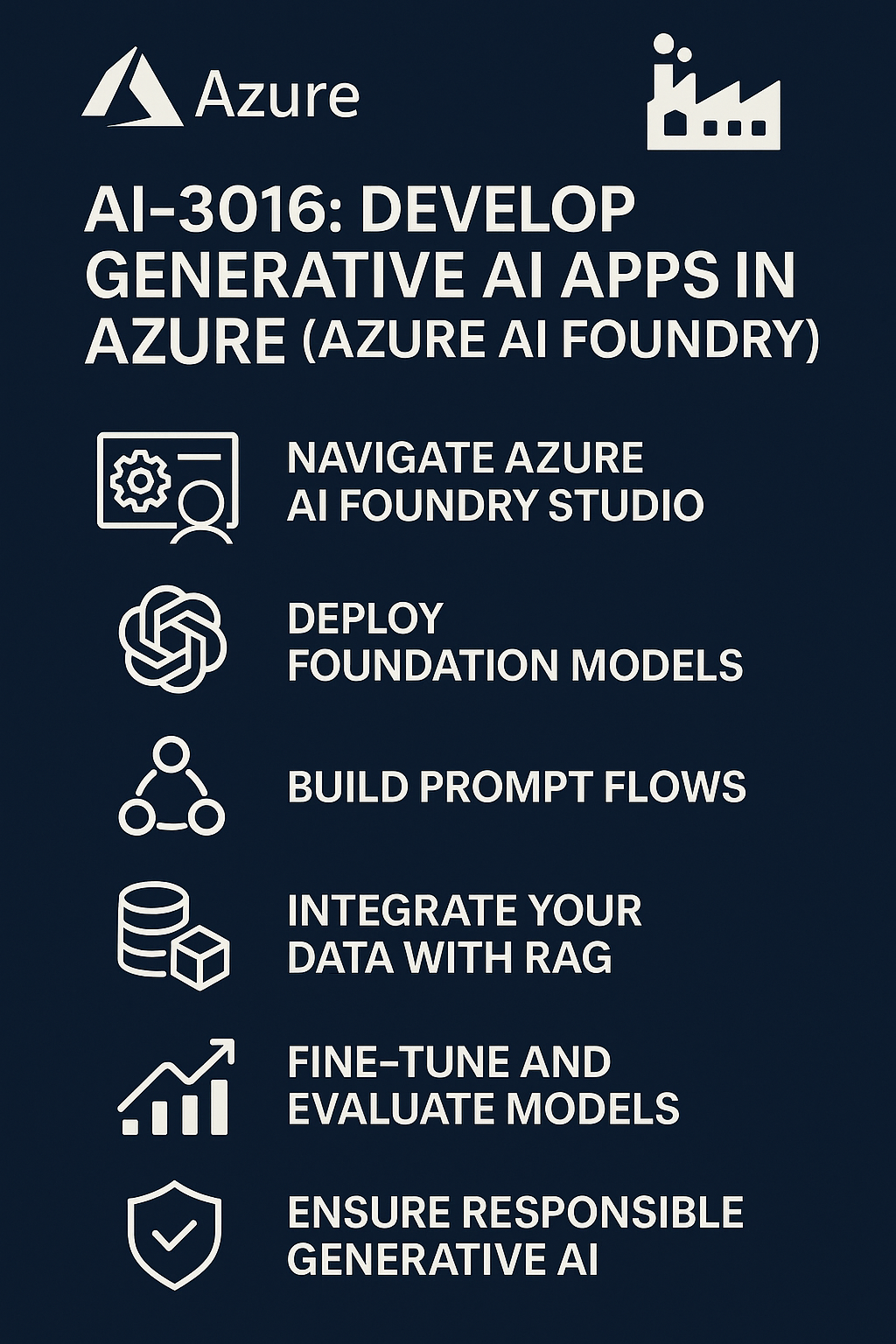
With the rapid evolution of Azure’s AI offerings, Microsoft and its training partners have introduced courses to skill up professionals. One notable training is “Develop Generative AI Apps in Azure (AI-3016)”, which is a one-day intermediate course focused on building custom copilots using Azure’s platform (Azure AI Studio/Foundry). This course (code AI-3016) which is Microsoft AI-3016 training teaches participants how to use Azure’s generative AI tools to create applications that use LLMs to converse with users, often referred to as custom copilots. According to the course outline, students get hands-on experience with the full AI app lifecycle: selecting and deploying models from the Azure AI model catalog, developing prompt flows, implementing retrieval-augmented generation (RAG) with their own data, fine-tuning models, and ensuring responsible AI practices. In other words, it’s a crash course in Azure AI Studio/Foundry features – covering how to ground a GPT model on enterprise data, how to build and test a conversational client, how to fine-tune or customize models, and how to evaluate and optimize the AI’s performance. The target audience is typically data scientists, AI engineers, and developers looking to create custom AI solutions on Azure.
Does AI-3016 grant a certification? Upon completion, learners can earn a Microsoft Applied Skills credential for generative AI on Azure. Specifically, note that Obtaining the Microsoft Azure AI-3016 training Applied Skill Credential certifies your familiarity with developing generative AI apps on Azure. This implies there might be an assessment or lab component whereby one can demonstrate skills and get a certificate (distinct from role-based certifications like Microsoft AI-102 , this is a skills badge focused on generative AI app development). So while AI-3016 is not an official exam like AI-102, it does provide an Applied Skills certification which validates one’s competency in using Azure AI Foundry to build custom copilots. This credential can be a valuable add-on to your resume, signaling to employers that you are up-to-date with the latest Azure generative AI technology.
From a career perspective, expertise in generative AI is in very high demand, and those who can demonstrate it are commanding strong salaries. In the U.S. market (which the user is focused on), AI engineers already earn six-figure average salaries. For instance, data from 2024 shows even entry-level AI Engineers make around $113k per year on average in the USA, with mid-level at $153k and senior roles above $200k. Having hands-on experience and a certification in Azure’s generative AI platform can position someone for roles like AI Engineer, AI Solution Architect, or Conversational AI Developer, where they might be responsible for implementing AI copilots and agents in an enterprise. Many companies are actively seeking talent who understand how to integrate LLMs into products securely and effectively. The AI-3016 training directly builds those skills – e.g. connecting GPT-4 to enterprise data, using prompt engineering, and following responsible AI guidelines.
In practical terms, completing Azure AI-3016 and earning the credential shows employers that you can build a chatbot or AI assistant on Azure from scratch – including all the components like deploying models, hooking up knowledge sources, and iterating on prompts. This is a powerful competency at a time when so many organizations are exploring custom AI copilots (for customer service, internal knowledge bots, etc.). Beyond potentially improving one’s salary prospects, this kind of certification can help land a job in the first place, as it provides concrete evidence of skill with cutting-edge AI tech. And for solution architects, it signals that you understand the Azure AI ecosystem well enough to design solutions with it. Given Gartner’s prediction that 80% of software engineering will involve generative AI by 2027, upskilling in this area is almost a requirement for staying relevant. In summary, Azure AI-3016 training helps professionals prepare for real-world generative AI projects on Azure and backs it up with a Microsoft-recognized skills credential. This can differentiate you in the job market, where AI expertise is both scarce and highly valued.
(As a side note: Microsoft also has traditional certifications like the “Azure AI Engineer Associate” (exam AI-102), which cover cognitive services and some Azure AI basics. The AI-3016 is more specialized on generative AI and custom copilots. While it doesn’t map to an exam cert, the applied skills badge and the knowledge gained are directly applicable to implementing Copilot solutions, which is what many organizations are looking for right now.)
Generative AI in Azure – Not Just for Chatbots
Finally, it’s important to clarify what Azure generative AI training January 2026 is and how Azure supports it, beyond just chatbots. Generative AI refers to AI systems (typically built on large machine learning models) that can produce new content – from text and code to images, audio, and more. These models (often large language models or diffusion models) are trained on vast amounts of data and can generate human-like outputs. The arrival of ChatGPT dramatically raised awareness of generative AI’s potential, and since then Microsoft has integrated generative AI across its products and cloud services.
In Azure, generative AI primarily comes via the Azure OpenAI Service, which gives Azure customers access to OpenAI’s powerful models (GPT-3.5, GPT-4, Codex for code, and DALL·E 3 for image generation) with enterprise-grade security and compliance. When we talk about Azure Copilots or custom copilots, these are usually powered by those underlying models. But Azure’s generative AI offerings are not limited to chat interfaces. For example:
- Document and content generation: Azure OpenAI can be used to generate documents, emails, or reports. Microsoft 365 Copilot uses these models to draft Word documents, Excel analyses, PowerPoint slides, and even email replies in Outlook. This shows generative AI assisting with content creation and summarization tasks beyond a Q&A chatbot.
- Code generation: GitHub Copilot, which is also part of Microsoft’s “Copilot” family, uses OpenAI Codex (a generative model) to suggest code and help developers write software. Azure DevOps is integrating similar AI assistance for writing scripts, deploying infrastructure, etc. So generative AI can improve developer productivity by handling boilerplate code or generating functions on the fly.
- Image generation and media: Azure OpenAI also provides image generation (OpenAI’s DALL·E). While not as prominently featured as text, this allows apps to create images based on prompts. Industries are exploring this for design, marketing content, or creative work. Azure AI services in the vision category (like Azure AI Content Understanding and Azure AI Vision) also incorporate generative techniques for tasks like creating captions for images or transforming content.
- Decision support and analysis: Generative AI can summarize large data sets, extract insights from documents, or even generate SQL queries to pull data. For instance, Copilot in Power BI can generate data reports and visuals using natural language prompts. This is another non-chatbot use: here AI acts as a generative analyst, creating charts or explanations from raw data.
- Workflow automation: In Power Platform, beyond just answering queries, Copilot features can build entire workflows or apps. Microsoft has demonstrated AI that generates Power Automate flows or Power Apps based on a user’s description. This is generative AI helping create software (a form of meta-generation).
- Multimodal assistants: Microsoft’s vision is for copilots that can handle text, voice, images, etc. Azure AI Studio (Foundry) supports multimodal content generation. This means you could build, say, an assistant that not only chats via text but can also process images or generate spoken responses (using Azure AI Speech). For example, a future copilot might analyze an uploaded diagram (vision AI) and then explain it in text or voice (language AI) – combining generative abilities across modalities.
In short, Azure’s generative AI is a broad toolkit that is “not just for chatbots.” Chatbots (like those built in Copilot Studio) are one popular application – using generative models to have dynamic conversations. But generative AI on Azure is also used for content creation, coding assistance, data analysis, and automating tasks. Microsoft emphasizes that Copilot-style AI is about augmenting human productivity in many domains, not only answering questions. For instance, Copilot in Dynamics 365 can generate meeting summaries and sales emails, Copilot in Security can draft incident reports – all these are uses of generative AI beyond a simple Q&A bot.
Even within conversational AI, generative models enable more than FAQ-style bots: they allow actions and transactions via natural language. A copilot might handle a full customer booking process, not by following a rigid script but by intelligently understanding the user’s intent and querying databases or invoking APIs as needed (guided by plugin connectors). This blurs the line between “chatbot” and general AI agent.
To give a concrete example of scope: Microsoft 365 Copilot (which uses Azure AI in the backend) can draft documents, summarize meetings, organize your inbox, and create presentations. Those tasks are far beyond a chatbot – they involve generating and modifying content in various apps. Similarly, Copilot Studio can build a bot that not only answers a question but maybe kicks off a workflow (like creating a support ticket) based on the conversation. Meanwhile, Azure AI Foundry could be used to build a custom AI that analyzes legal contracts and generates a risk summary for a lawyer – again a generative task that’s not an interactive chat per se, but a form of AI assistant.
Therefore, generative AI is a foundational technology for a variety of AI-driven capabilities on Azure. It helps in writing, coding, image creation, decision support, and yes, conversational bots. The question “is it mainly for chatbots or other purposes as well?” can be answered with a resounding: it’s for many purposes. Chatbots are one prominent embodiment (and indeed were among the first uses in enterprises), but generative AI in Azure is now woven into many services and use-cases. It serves as the engine behind any feature where the software is creating new content or responses dynamically – whether that content is a block of text to the user, a piece of code, an image, or a full report.
Conclusion
In summary, Microsoft’s Azure and Power Platform have rapidly evolved to embrace the era of generative AI, introducing Copilots across the board. We talk about how Dynamics Edge Azure Copilot training can be such a helper for your AI cloud management, and how you can build Custom Copilots using Azure AI Studio/Foundry with Azure OpenAI and other services. We also examined Copilot Studio (formerly Power Virtual Agents) on the Power Platform side, which democratizes building conversational AI with a low-code approach. The evolution of these tools – from PVA to Copilot Studio, and from Azure AI Studio to Foundry – reflects a broader shift: AI assistants are becoming central to software experiences, and platforms are being retooled to make creating these assistants easier and more powerful.
For architects and AI engineers, it’s crucial to understand the distinction and interplay between Copilot Studio and Azure’s AI platform. Depending on requirements, one might use the straightforward Power Platform route to spin up a chatbot integrated with enterprise systems, or opt for the Azure Foundry route to craft a bespoke AI solution with fine-grained control. The good news is that Microsoft’s ecosystem supports both ends – and even allows hybrid approaches – all under the unifying “Copilot” vision.
We also highlighted how Microsoft’s renaming of Azure AI Studio to Azure AI Foundry brought new enterprise capabilities, and why the name change underscores a commitment to turning Azure into an AI “factory” for organizations. Finally, as generative AI becomes ubiquitous, training like Azure AI-3016 can equip professionals with the skills to leverage these technologies, opening doors to exciting career opportunities in a market hungry for AI talent. Generative AI is not just about chatbots answering questions – it’s about AI-powered creativity and productivity in every domain, from writing code to summarizing data. And whether through a no-code Copilot Studio interface or a code-first Azure Foundry project, businesses and developers now have the tools to harness generative AI on Azure for far more than chat. The era of custom copilots has only just begun, and its evolution will likely continue to accelerate in the years ahead, transforming how we build solutions and how we work.
Have a Question ?
Fill out this short form, one of our Experts will contact you soon.
Talk to an Expert Today
Call Now